Inbox
Your own mailbox inside WealthY, sorted by what needs you, with replies drafted and every email tied to the client it came from.
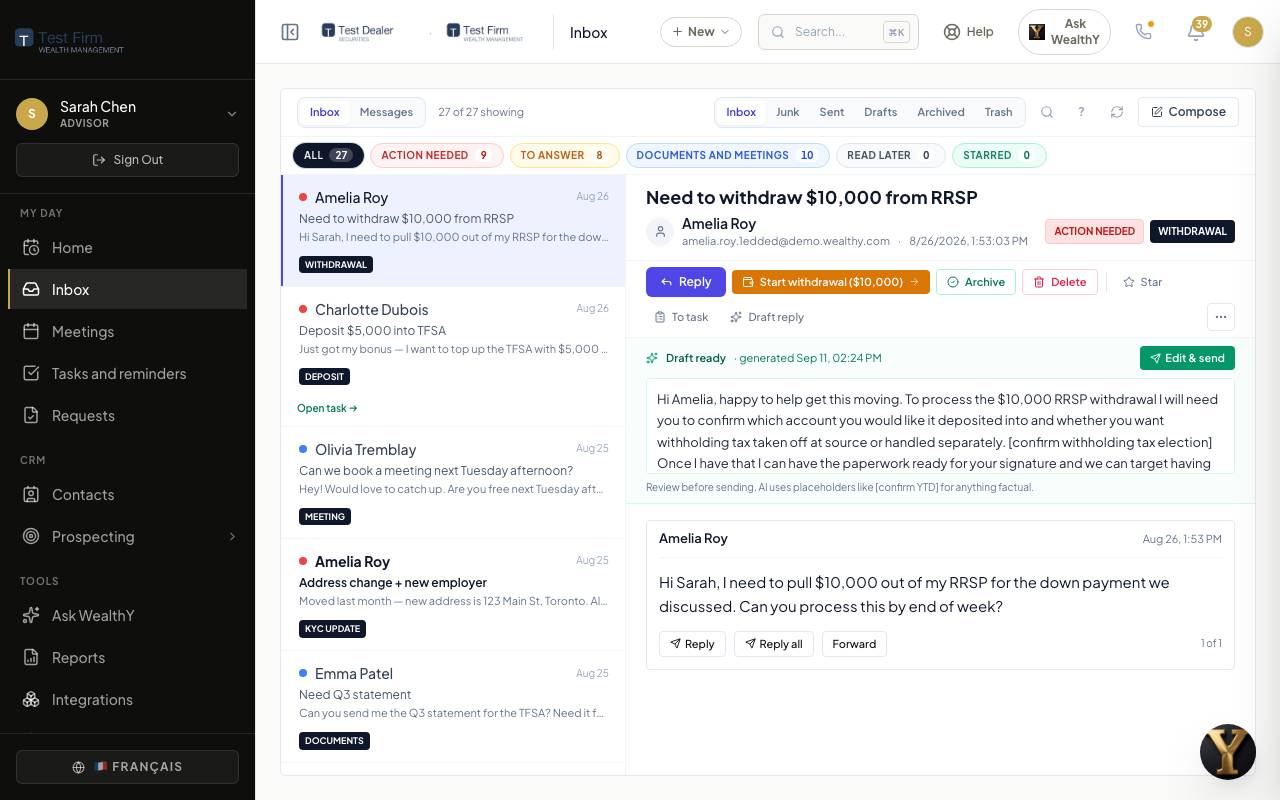
Inbox is your Gmail or Outlook mailbox, read by WealthY. Nothing moves: the mail stays where it is. What changes is the order you see it in, and what sits next to each message.
Connect your mailbox
- Open Integrations in the sidebar.
- Click Connect on Gmail or Outlook and sign in with your work account.
- WealthY asks for mail and calendar access only. It never asks for your contacts.
- Come back to Inbox. The first sync takes a minute.
More than one mailbox is fine. Each one syncs every two minutes.
What you see
- Tiles: Action needed, To answer, Documents and meetings, Junk. Click one to filter.
- List on the left, sorted by priority then by time. The client's name appears when the sender is in your book.
- The message on the right, full body, with the actions below it.
What WealthY does to each email
- Reads the intent: a withdrawal request, a question, a complaint, a document, a meeting reply. Calendar replies (Accepted, Declined, Tentative) are recognized without the AI and filed on the meeting itself; a decline shows a Reschedule button.
- Sets a priority so the ones that need you are on top.
- Drafts a reply when one is due. Overnight, WealthY prepares drafts for the messages that arrived during the day. You edit and send; nothing goes out on its own.
- Finds the client and shows the account, the last meeting and the open requests beside the message.
Actions on a message
| Click | What happens |
|---|---|
| Reply | The composer opens with the draft. Drafts save on their own if you navigate away. |
| Convert to task | A task with the email attached, due date suggested. The row shows a Task created chip linking back. |
| Snooze | The message leaves the list until the time you pick. |
| Done | Archived from the WealthY list. Your mailbox is untouched. |
| Open client | The client record, with the email already in their timeline. |
Messages mode
The pill at the top of the card switches from Inbox to Messages: team channels, direct messages with colleagues, and secure conversations with clients who message you from the portal. Same page, same layout.
For the firm owner
- Supervisory access to an advisor's inbox is off by default. When the firm turns it on, an admin support seat can read it for review, and every read is written to the audit log.
- Outbound email can be copied to the firm's compliance archive (Global Relay, Smarsh or a custom address) from Integrations.
- Deliverability for the firm's sending domain (SPF, DKIM, DMARC checks) lives under Settings > Email deliverability.
On a phone
Inbox works at phone width: tiles collapse to a row, the list and the message stack, and the composer fills the screen.