KYC
The know-your-client record behind every account and request, kept current with the client, and the firm's own editor for the questions it asks.
KYC in WealthY is one record per client that every other part of the product reads: the dealer paperwork, the suitability check, the meeting prep, the questionnaires. The questions are the custodian's own vocabulary, grouped the way a client reads them, and the firm can reword, trim, reorder or extend them from one screen.
The record
Thirteen groups, in this order:
- Personal information
- Address and contact
- Verification of identity
- Banking information (last digits only)
- Employment and source of funds
- Financial situation (income and asset bands)
- Risk profile, the questionnaire that produces the risk rating
- Investment objectives and time horizon
- Regulatory declarations (insider, other accounts, politically exposed)
- Third party determination
- Tax residency (CRS and FATCA)
- Shareholder communication instructions
- Beneficiaries and trusted contact
Each field knows where it came from: the client, the advisor, a document, an import. The record shows the last confirmation date and when the next review is due.
Where it is filled
- Advisor: the client record, Financial plan > KYC. Edit any group inline. The Prepare and invite flow for a new client walks every group the paperwork needs, prefilled from what you know.
- Client: Confirm your information on their To do, in plain words on their phone. Each group saves as they go.
- Questionnaire: a KYC section sent as a questionnaire comes back as values to accept row by row. See Questionnaires.
- Import: a spreadsheet or CRM import prefills names, dates, address, employment, income and asset bands.
What the record drives
- Paperwork: every dealer form is filled from it. See Requests.
- Suitability: the client's holdings are compared with the risk rating and the result is stated as a fact on the record (aligned, more growth than the rating implies, less). It asks you to document the rationale; it never recommends.
- Review timing: when a review is due, the client appears in Ask WealthY's "whose KYC review is due" answer, on the advisor's Home under Practice health, and a KYC review request can be sent.
- Prep: the KYC and plan updates section of every meeting prep.
The firm's own questions
Operations > KYC questions. One screen, every question the product asks, grouped as the client sees them.
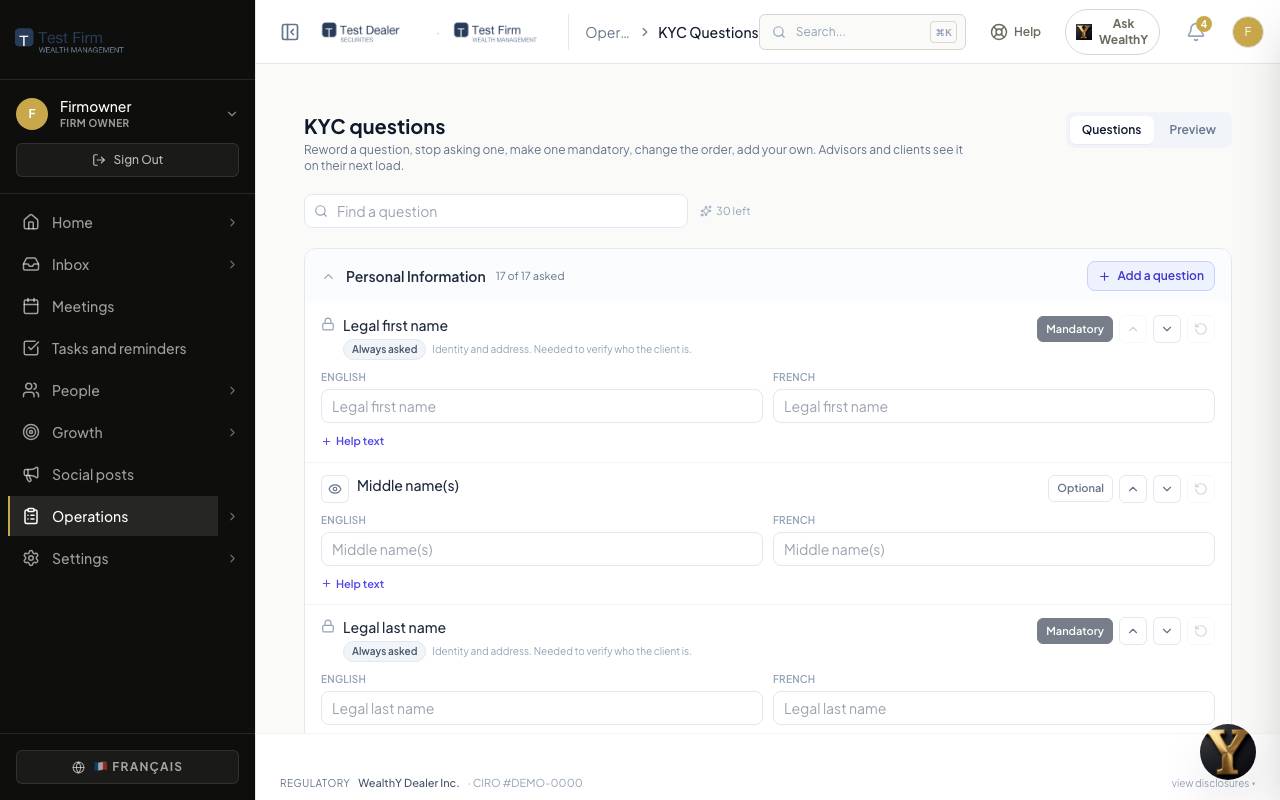
For each question:
- Reword it, in English and in French, and add help text under it.
- Stop asking it, or Ask again.
- Make it Mandatory or Optional.
- Move it up or down inside its group.
Per group, Add a question of your own: short text, long text, number, date, email, phone, pick one, pick several, yes or no, dollar amount, percentage. It is asked everywhere the built-in questions are, and its answer is kept on the client's record.
There is no save button. Every change saves on its own and the row says so. Advisors and clients see the change the next time they load the page. The Preview tab shows exactly what they see now.
What cannot be changed
Some questions carry a lock with one line saying why: identity and address, occupation and source of funds, the suitability answers, declarations the firm must keep on file, tax residency, shareholder communication instructions. A locked question can be reworded but not hidden or made optional. The rule is enforced when anything is saved and when anything is read, not only on the screen.
Sensitive values
- Social insurance numbers are entered only at the moment paperwork is filled and are never stored or logged. The record keeps the last four digits.
- Bank account numbers are kept as the last digits. Routing identifiers are kept in full.
- Identity documents live in a private store, readable only by the firm's staff and the assigned advisor, with every read logged.
How this information is collected, used and kept is set out in the privacy policy.